



WoW Midnight Interface Update – Did We Really Need This?
When I logged into the Midnight beta and saw the UI for the first time, my brain did that little “wait, what?” lag – it was like my brain had hit the brakes. Frames were different, nameplates were yelling at me, and the game was suddenly telling me about my damage meter – it was a bit overwhelming. As someone who’s been through the “30 addons or suffer” era, seeing Blizzard dump so many addon-style features into the base UI felt both exciting and a little unnerving.
In this post, I want to go through the Midnight interface update with you – what actually changed, how it feels to play with, and whether it solves more problems than it creates. I’ll cover nameplates, boss mods, damage meters, cooldown tracking, the addon drama, and how the community is reacting. By the end of it all, I’ll try to figure out the big question we’re all whispering about in guild chat: did we really need this overhaul or did Blizzard just kick our muscle memory for good?
What Exactly Is the Midnight Interface Update?
At its core, the Midnight interface update is Blizzard finally owning up to the fact that addons have been carrying the game for way too long. They’re pulling a bunch of essential addon features into the default UI: better nameplates, a built-in damage meter, boss alerts, and more advanced cooldown tracking. Their goal is that you should be able to log in after a fresh install and still have a functional, modern UI without having to head to CurseForge.
To break it down a bit, here’s a quick rundown of the big pieces of the Midnight UI update and what they’re trying to replace or mimic from the addon world. This is from a player’s perspective, not a marketing presentation.
| Feature / Change | What Midnight Adds | Roughly Replaces / Mirrors |
|---|---|---|
| Enhanced Nameplates | Lethal cast highlights, better debuffs, clearer CC info | Plater / Threat Plates style setup |
| Built-In Damage Meter | Simple DPS/HPS meter tracked by the game itself | Details!, Recount |
| Boss Alerts & Timers | On-screen warnings, cast timelines, targeted ability callouts | DBM, BigWigs |
| Personal Resource Bar 2.0 | Customizable HUD element for your own resources | Various unit frame / WA bars |
| Cooldown Manager Upgrades | Buff/debuff tracking, external def CDs, sound alerts | Parts of WeakAuras / TellMeWhen |
In theory, this all means fewer mandatory addons and a more even playing field. But in practice, it feels like Blizzard is trying to fit 20 years of addon development into one expansion. Some of it works out okay; some of it feels like an addon beta that I wouldn’t even install yet. However, whether you like it or not, this is the new baseline UI we’re all getting in Midnight.
Nameplate Overhaul – Lethal Casts in Your Face
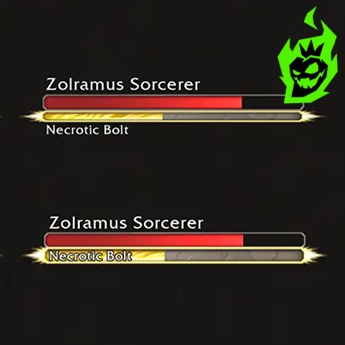
Nameplates in Midnight aren’t just “those health bars” anymore. Blizzard has gone all in on making them more informative and reactive, especially in the heat of combat. The big news is that “lethal” or extremely dangerous casts get special treatment: the cast bar gets bigger, more noticeable, and basically screams “kick me now” at you. In dungeons and raids, this means the game itself is trying to tell you which abilities will wipe you, instead of relying on DBM yelling in your ear.
There are also changes to how crowd control and debuffs show up. In PvP, CC on enemies and allies is way more clear on nameplates, and enemies can display more relevant buffs and debuffs than before. The idea is that you should be able to read the battlefield just by glancing at nameplates, without needing an addon like Plater to highlight everything in neon. When it works, it genuinely feels cleaner and more readable, especially for newer players who don’t know the names of every one-shot yet.
Built-In Damage Meters – State-Sponsored Parsing
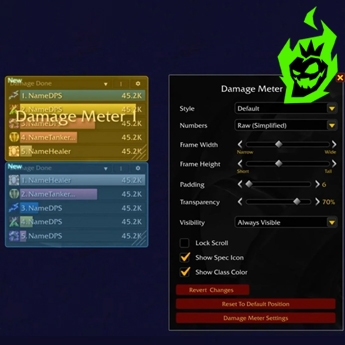
This might be the most “finally” feature of the whole update: WoW now has a built-in damage meter in Midnight. No more asking “who’s got Details installed?” before you can compare anyone’s DPS. The default UI now comes with a panel that shows your damage and healing in a fight, tracked by the server instead of just your local combat log. As someone who’s spent way too much time alt-tabbing to fix broken damage meters, seeing this in the base UI is actually pretty nice.
Here’s how the built-in meter stacks up for me:
| Aspect | Built-In Meter (Midnight) | Details! / Recount Addons |
|---|---|---|
| Setup | Already there, no install needed | Requires download, updates, profile setup |
| Depth of Info | Basic DPS/HPS and simple breakdowns | Very detailed breakdowns and analysis tools |
| Reliability on Patch Day | Always works (in theory) | Sometimes broken until addon updates |
| Target Audience | Casuals, pugs, curious players | Min-maxers, analysts, raid leads |
The sweet spot for most players will be using the default meter as a baseline and only getting an add-on if you actually need that extra detail. It’s not perfect, but its a heck of a lot better than just winging it & hoping “it felt like I did good damage, buddy”.
Boss Alerts and Timers – Blizzard vs. DBM
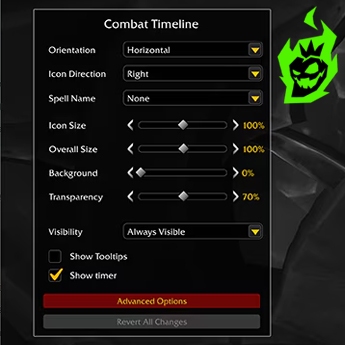
For nearly the whole lifespan of WoW, anyone serious about raiding has pretty much required one of Deadly Boss Mods or BigWigs. Now, with Midnight, Blizzard is trying to change all that by adding raid & dungeon boss alerts right into the base UI. When you’re in a tough fight, you’ll get some on-screen warning shots for major abilities, a countdown for upcoming mechanics & a big callout when you’re targeted by something nasty. It’s like the game finally learned to shout “move or die, mate!” all on its own.
The idea here is pretty sound. Blizzard’s after making sure that success in raids isn’t dependent on whether you’ve got a specific add-on loaded up. They’ve even been talking about designing Midnight’s encounters with the assumption that players might not be using any boss mods at all, so you get a bit more reaction time & clearer warning signs. The built-in alerts help make that vision a reality, so players who are just starting out aren’t instantly doomed in raid content. It brings down the barriers to entry and makes raids less of a “you need to install these add-ons to survive” club.
 Single Mythic+ Runs
 Ready to start in 4 mins
Multiple Run options
137-141 ilvl loot
Ready to start in 4 mins
Multiple Run options
137-141 ilvl loot
 Delves
Safe & fast runs
Epic rewads
Titles. mounts & achievements
 3v3 Arena Boost
Rank 1 Gladiator boosters
Up to 2400+ rating carries
Ready to start in 10 mins

But the reality on the ground – for now – is a bit mixed. The built in alerts do look nice & are a heck of a lot better than nothing, just not quite up to the polish & precision of DBM or BigWigs yet. In beta, timers have from time to time been way off, or jittery, and customization options aren’t anything like what you get from a proper boss mod. You can’t tweak every sound, every bar position or alert style like you could with a good boss mod. For guild progression, most groups are still going to want a good boss mod, at least for now. But if you’re just in LFR or a normal raid, the base alerts are a huge leap in the right direction over just getting smashed by some mechanic & not even knowing what hit you.
Personal Resource Bars & Cooldown Manager – Blizzard’s Mini-WeakAura

Midnight’s not just about the flashy extras. It also gives some love to how you track your own resources & cooldowns, which is where a ton of us have leaned on WeakAuras & unit frame add-ons. Blizzard’s trying to meet us halfway by stepping up the personal resource bar & making the Cooldown Manager a lot more useful & customizable.
These changes are for players who don’t want to get into Weak Aura scripting but still want their UI to tell them what’s going on. If you’ve ever thought “I just want my own energy levels, important buffs & big cooldowns visible without having to spend two hours fiddling with code strings”, then the Midnight tools are for you. They’re not as powerful as full-blown add-ons, but they’re a heck of a lot better than the old “just hope you notice the tiny buff icon” way of doing things.
Personal Resource Bar 2.0
The Personal Resource Bar used to be this clunky thing that behaved like a nameplate under your feet. In Midnight, Blizzard turns it into a proper HUD element you can edit in Edit Mode. You can move it anywhere, change its size, tweak how it looks, and generally treat it like a proper part of your layout. For classes that live & die by their resources or secondary bars, this is a game-changer.
As someone who’s spent countless hours making custom WeakAuras just to show combo points, Holy Power or Maelstrom where they needed to go, seeing Blizzard finally get on board with this idea in the default UI is nice. Newer or more casual players can now get a decent resource display without having to fiddle with an add-on. It also means if you’re playing on a new machine or a fresh install, you’re not completely in the dark about your own energy or secondary resource levels.
Is it as flexible as those crazy custom bars we’ve built with WAs & ElvUI? Not a chance. You’re not going to do wild animations, crazy color logic or super conditional behavior. But as a base-level resource bar, Personal Resource Bar 2.0 is a solid improvement, & for a lot of specs, it’ll get them just fine right out of the box.
The New Cooldown Manager – Baby’s First WeakAura
The Cooldown Manager started as a pretty simple bar to track a few key abilities, but Midnight cranks it up a notch. You can now choose specific buffs, debuffs, and cooldowns you want to track, including things on your target or even external defensives on your teammates. On top of that, you can set up profiles and add sound alerts for particular effects, which starts to feel suspiciously like a mini-WeakAura system.
For the average player, this is exactly what they needed. You can say to the game “track my main defensive cooldown, my big damage cooldown, and that important debuff on the boss”, and that’s it – no importing add-ons or writing LUA scripts needed. This is especially great for alts, as you don’t have to spend a ton of time rebuilding a whole new setup. The UI is very simple, and the logic is more “check some boxes” rather than “write a script” – which makes it way more accessible to have a functional and informative setup.
Advanced users, though, are going to feel the limits. You don’t get the same level of conditional triggers, complex displays, or dynamic grouping like WeakAuras has to offer. If you want some specific display to pop up only when you’ve got under 5 seconds left and you’re above 80 resources and the boss is enraged, for example, that’s still an addon job. The Cooldown Manager is a great built-in alternative for the basics, but its not going to replace WeakAuras for power users, and probably never will.
Addon Restrictions and the “Addon Apocalypse” Drama
All of these new features also brought with them some pretty major changes to the addon landscape. Blizzard has put some new restrictions on what add-ons can do, especially around automation and real-time combat logic. The idea is to stop add-ons from making decisions for us, and to keep them focused on cosmetic and informational changes rather than actual gameplay advantages. It’s a nice idea in theory, but the way it all shook out was pretty dramatic.
During the early beta for Midnight, there was a lot of buzz about an “Addon Apocalypse”. Some of the bigger addon authors were pretty upset about how these restrictions were rolled out, and what it could mean for their long-running projects. There were moments where it seemed like some beloved add-ons might not even make it to the new expansion, or might have to change their functionality entirely. Players freaked out about losing ElvUI, WeakAuras, and other staple tools they’d used for years. To a lot of people, it felt like Blizzard was ripping out the guts of the game experience overnight.
What the Community Is Saying – Hype, Salt, and Copium
If you scroll through Reddit or forums, the reaction to the Midnight UI update is basically a three-way free-for-all between hype, anger, and cautious optimism. Some players are genuinely stoked that they can log in with no add-ons and still get a solid modern interface. Others feel like Blizzard is nuking 20 years of community innovation and shipping a worse version of what we already had. Most of us are somewhere in the middle, hoping our favorite stuff keeps working.
I’ve seen a pretty split reaction to the update in conversations all across the web. Here’s a rough breakdown of the main community vibes I see coming up over and over.
| Player Type | General Reaction | Core Argument |
|---|---|---|
| New / Returning Players | Mostly positive | “Nice, I don’t have to install a million addons.” |
| Casual Raiders / M+ Puggers | Cautiously optimistic | “Built-in tools are good, as long as they work.” |
| Hardcore Raiders / Mythic Pushers | Mixed to negative | “Blizzard’s version is weaker than our addons.” |
| UI / Addon Nerds | Concerned but adapting | “We’re losing the power and flexibility we rely on.” |
| “No Addons Ever” Purists | Surprisingly vindicated | “Told you the game should be playable as-is.” |
For a lot of people, the biggest concern is losing that sense of control. We’ve spent years customizing our layouts, learning how to use WeakAuras or finding the perfect UI pack, and Midnight feels to a lot of us like the developers taking control back. Even if the intention is pure, that loss of control is going to sting, especially if the new tools don’t yet live up to the flexibility we’re used to.
At the same time, a lot of people do see it as an inevitability. WoW has always trail-blazed pretty far ahead in terms of player customization, and new MMOs arriving these days ship with strong default UIs. Asking new players to install boss mods and damage meters just to get started has always been a bit of a bit wild. The Midnight UI update might be a bit of a mess right now, but a lot of the playerbase is hoping that in a year, we’ll look back and wonder how we ever lived without half of these built-in features.
Preparing for Midnight – How ChaosBoost Can Help
If you’re looking at all these UI changes and a whole new expansion and thinking “that’s a lot to adapt to,” you’re not wrong. ChaosBoost is a professional boosting service that can help you get your characters ready for Midnight’s launch so you can focus on learning the new interface instead of grinding old content. Whether you need gear, dungeon clears, or raid progress to catch up before diving into Midnight, ChaosBoost lets experienced players handle the heavy lifting while you enjoy the parts of the game you actually care about.
So… Did We Really Need This Overhaul?
Now for the burning question: was the Midnight interface update really needed, or was it just changed for the hell of it? From where I’m sitting as a veteran player who’s spent years messing with UIs, the answer is – annoyingly – a solid maybe. Some of it was way overdue; some of it feels like Blizzard trying to invent the wheel when the community had it covered. On the “yes, we really needed this” side, new and returning players are going to love the modern, tidy default UI that comes with this update. Built-in damage meters, clearer nameplates and boss alerts all make group content way more accessible and less reliant on third party addons, and Blizzard designing encounters with no-addon players in mind is a positive move for the long-term game.
On the “no, we didn’t need it like this” side, the complaints have some real bite, because Blizzard’s versions of some of those addon features are just not as good as the originals. They’re less customizable and often feel a bit shallow. When you’re a veteran player who had a really functional, tweaked UI, this can feel like losing control and flexibility rather than gaining any. And the addon restrictions – that’s a fear that’s hard to fully shake off. For me personally, the ideal future is a solid default UI that works just fine with zero addons, and then the talented addon authors can get creative and add some fun and advanced customization for those of us who want it. So did we really need the Midnight interface update? I think yes, but with a big “but” tacked on, because – we definitely did need the modernisation and the reduced addon dependency – we just didn’t need to skate by the bumps and the destroyed profiles along the way.

